
Why installations go wrong — the problem-driven opening
Most deployment headaches come from assumptions: expected power, neat cable runs, and tidy mounting rarely match real trucks or rugged utility vehicles used for oil and gas fleet management. Start with that problem mindset—if you don’t plan for vibration, heat and irregular power, the DVR will fail when you need footage most. This guide takes each common failure, shows a direct fix, and prioritizes steps by impact so teams can act fast and with confidence.

Top root causes—quick checklist to diagnose failures fast
– Unstable power: voltage spikes, brownouts, and poor ignition sensing. – Overheating: cramped enclosures or metal trays without airflow. – Data loss: circular overwrite without proper event locking or corrupt SD cards. – Time drift: GPS or RTC not synced, timestamps become useless. – Network blind spots: cellular or Wi‑Fi not provisioned for remote pull. Check these first; they explain about 80% of repeat service calls from field crews.
Design and integration checklist for reliable results
– Power design: use a dedicated fused ignition sense line plus a wide-range DC input (9–36V). Add transient suppression (TVS diodes) and a small UPS buffer for clean shutdowns. – Grounding: single-point chassis ground; avoid floating grounds between chassis and trailers. – Mounting: vibration-damping brackets and thermal ventilation matter more than compactness. – Camera selection: choose glass-lens cameras for low-light lanes; infrared helps at night but watch reflections on safety glass. – Storage: use industrial-grade eMMC or SSD rated for mobile write cycles; schedule daily health checks. – Integration point: align DVR timestamps with the telematics unit’s GPS feed for event correlation—this is core to good incident reviews and to linking footage with logged telematics events.
Field considerations—what drivers and techs will actually face
Expect dust, salt spray and heavy sun for crews working around platforms and supply vessels in the Gulf of Mexico. That single real-world condition changes component choices: IP67 housings, conformal-coated PCBs, and stainless brackets reduce repeat maintenance. Factor routine washdown and HSE inspection needs into placement and service access.
Configuration and software that prevent data gaps
– Recording strategy: set continuous low-res baseline with event-triggered high-res segments. This cuts storage but retains evidentiary detail. – Codec choice: H.265 gives space savings but confirm CPU headroom on the unit. – Encryption & chain-of-custody: enable secure hashes for stored clips and log user access. – Remote retrieval: test cellular failover and chunked upload; don’t assume single-carrier coverage. – Firmware lifecycle: lock firmware versions after validation; roll updates through a staged fleet pilot before full rollout.
Common pitfalls integrators make—and how to avoid them
– Using consumer-grade SD cards: they fail under constant rewrite—use industrial parts. – Relying on a single power source: add hardwired ignition plus backup to avoid corruption during shutdown. – Ignoring time sync: fix this by tying DVR time to GPS or the fleet telematics clock. – Mounting behind dashboards: it hides heat and makes service slow—place the DVR where techs can swap media in two minutes. – Overlooking user workflows: if operators can’t tag events easily, they won’t; provide one-button tagging and link it to the vehicle’s event log.
Alternatives and selection guidance
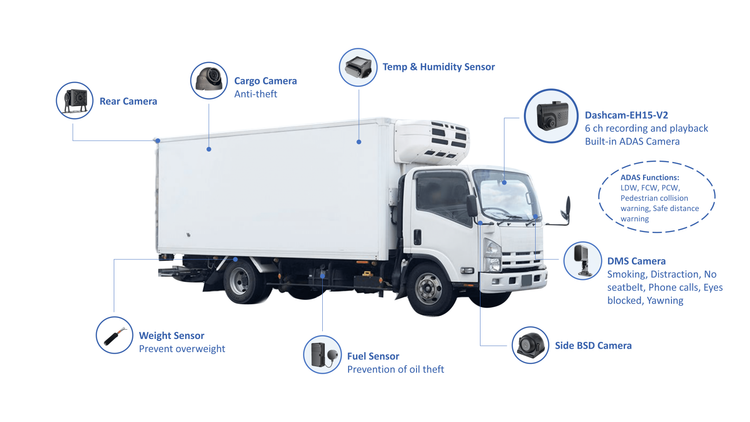
Options to compare: 4-channel mobile DVR, 8-channel DVR, cloud-first camera systems, and integrated telematics + camera modules. Choose 4-channel when you need multiple viewpoints (driver, road forward, cargo, rear) with onboard recording and limited bandwidth. Consider cloud-first where constant high-bandwidth links exist and you want live streaming. If you run mixed fleets, a telematics-integrated camera module can simplify event correlation, but watch vendor lock-in and firmware update policies.
Quick rollout plan and common mistakes to avoid during deployment
1) Pilot three vehicles for two weeks—run full-day cycles and simulate power events. 2) Collect logs and footage, then adjust mount points and power filters. 3) Train drivers on event tagging and basic troubleshooting; include a one-page reference for swap procedures. Avoid skipping the pilot. Skipping it is the single biggest cause of mass rollbacks that cost time and trust.
Final synthesis
Keep the approach simple: diagnose root causes, design for the field, and validate with a small pilot. When integrators, safety teams and operators treat the 4-channel DVR as part of a system—power, thermal, storage, and telemetry—they get footage they can trust. Years of installations and service calls teach the same lesson: practical, tested practices beat clever one-offs. For those building systems tied to operational workflows and regulatory checks, the practical engineering and field-proven processes offered by BSJ fit naturally into a disciplined program that reduces rework and keeps footage reliable.